

Less retyping after hours
Capture readings, photos, findings, and signatures once — inside the job record.
FieldLoom turns inspections into photo-rich reports, clean estimates, customer approvals, and payments — before you leave the job site.
Free to download · Solo Starter is free forever
See how FieldLoom worksWhy FieldLoom · The whole story
Inspect, report, quote and get paid from the driveway, with Talk Mode, the AI receptionist and your own website in the same app. Solo Pro is $34.99 a month with everything included and nothing to add on.
Texting, the AI receptionist and card payments are part of Solo Pro and Crew. More FieldLoom videos →
New · Start Your Shop · Free
Thinking about going out on your own? Answer 7 quick questions and get a free plan for your trade, in the right order: business name, LLC, EIN, license, insurance, prices, website and your first ten customers. Every step links to the official Texas source. Check your license with the state, and let the coach draft your Google profile. English or Spanish, no account needed.
Why FieldLoom exists
Capture readings, photos, findings, and signatures once — inside the job record.
Send clean branded PDFs instead of messy texts, scattered camera roll photos, or handwritten notes.
Turn findings into estimates, get approval, and collect payment while the problem is fresh.
Brand film · A day with FieldLoom
Ride along with Mike, a one-truck HVAC pro in Austin, from 6:45 AM to 6:10 PM: the whole day planned on one screen, On My Way and arrival texts that send themselves, live superheat on an AC tune-up, photo findings with prices, Present mode, a signed PDF report and payment before he leaves the driveway.
Texting, the customer portal and card payments are part of Solo Pro and Crew. Solo Starter is free forever with checklists, findings, signatures, estimate PDFs and 10 PDF reports a month. More FieldLoom videos →
The FieldLoom flow
Simple enough for a solo tech. Powerful enough for a growing shop.
Trade checklists, readings, pass/fail items, and findings in one guided flow.
Add photos, labels, arrows, before/after shots, and notes tied to each finding.
Generate a branded PDF with readings, photos, recommendations, and customer signature.
Create estimates and invoices, send them by text/email, and take the card right there with Tap to Pay on iPhone.
15 trades, one app
FieldLoom ships ready-made checklists for 15 trades, plus a General template you can shape to any job. HVAC pros still get live superheat, subcooling, delta-T and static pressure. Mobile mechanics get a 28-point vehicle inspection, VIN scan with automatic year, make and model, and service history per vehicle.
Tap a trade to see its own App Store page, with screenshots from that trade.
Tap to Pay on iPhone
With Tap to Pay on iPhone, there’s no need for additional card readers or terminals. All you need is your iPhone and the FieldLoom app.◊ When the job is done, the customer holds their card, iPhone or Apple Watch to your iPhone and the invoice is paid before you leave the driveway.


◊ Tap to Pay on iPhone requires a supported payment app and the latest version of iOS. Update to the latest version by going to Settings > General > Software Update. Tap Download and Install. Some contactless cards may not be accepted by your payment app. Transaction limits may apply. Tap to Pay on iPhone is not available in all markets. For Tap to Pay on iPhone countries and regions, see developer.apple.com/tap-to-pay/regions. In FieldLoom, Tap to Pay on iPhone is available on Solo Pro and Crew with a Stripe account connected, in the United States. The Contactless Indicator mark, consisting of four graduating arcs, is a trademark owned by and used with permission of EMVCo, LLC. The Contactless Symbol is a trademark owned by and used with permission of EMVCo, LLC. Encrypted card numbers are temporarily stored on iPhone only for transactions made in Store and Forward mode.
Talk Mode · Hands-free
Follow Sam, a solo HVAC pro, from the first job to the last invoice. Siri briefs him on the way, FieldLoom offers to start when he pulls up, answers a customer’s questions in Spanish, reads the estimate out loud, closes the job from one sentence, catches what he forgot before he leaves and wraps up the day. Sam never types a word.
Talk Mode is part of Solo Pro and Crew. More FieldLoom videos →
AI Copilot for FieldService Pros
Three AI tools solo techs use on every call, live in FieldLoom today. Each one runs on-device with Apple Intelligence first and falls back to the cloud only when the phone can’t do it. Superheat, subcooling and every number on the report still come from FieldLoom’s calculation engine, never from a language model.
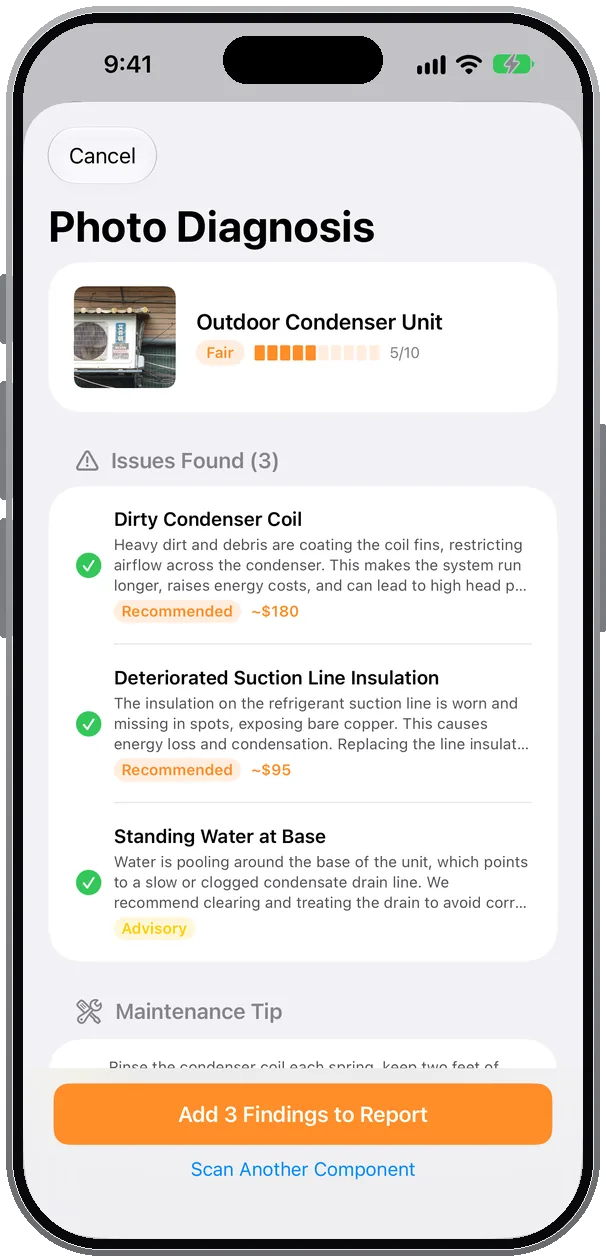
Photograph a condenser, contactor, capacitor or coil. The copilot names the component, scores its condition 1–10, lists each visible issue and drafts a finding with an estimated repair cost.
How techs use it: tick the issues you agree with. Each becomes a finding in the job with the photo attached, priced, and ready for the report and the estimate.
On-device first · cloud fallback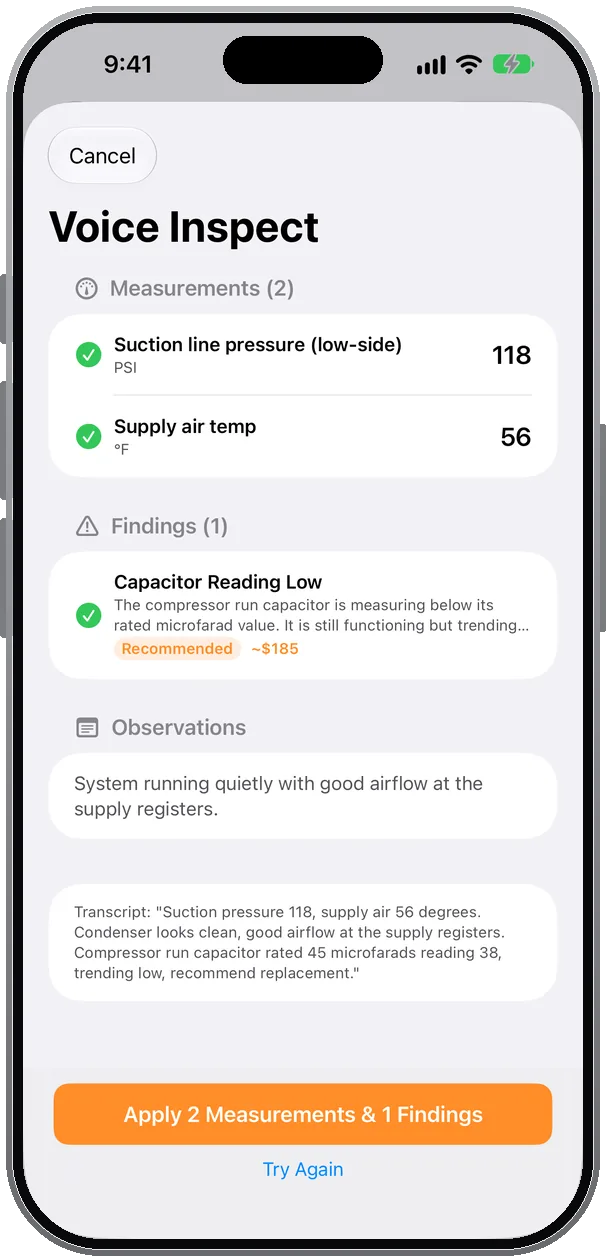
Keep your hands on the equipment and talk: “suction 118, supply air 56, run capacitor rated 45 reading 38.” On-device speech recognition transcribes it and the model sorts it into readings, findings and observations.
How techs use it: readings land in the right checklist rows, findings arrive with urgency and cost, and you review every line before anything is saved.
On-device speech + model · cloud fallback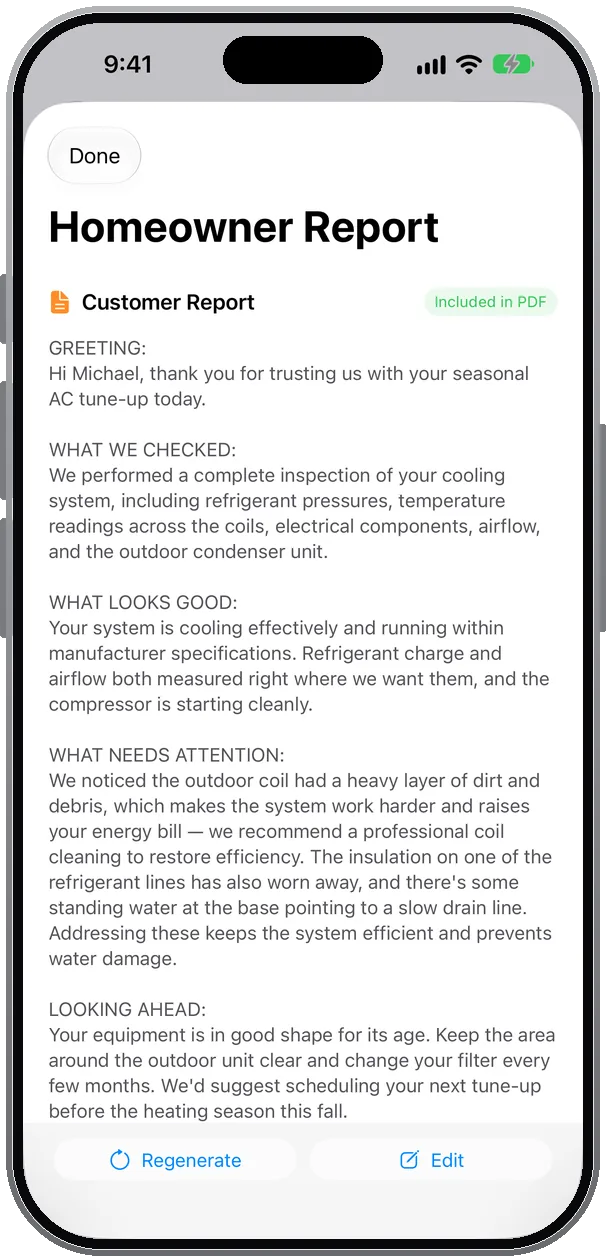
One tap turns readings, findings and photos into a plain-English page addressed to the customer: what we checked, what looks good, what needs attention. Apple Writing Tools are built into every notes field, so you can proofread, rewrite or make a finding sound more professional before it ships.
How techs use it: edit or regenerate, then it prints as its own page in the branded PDF, in English or Spanish, with the executive summary written the same way.
On-device first · cloud fallbackNew · Ask FieldLoom
“What’s on this week?” “Who hasn’t paid?” “When was I last at the Garcia house?” Ask FieldLoom answers from your own jobs, customers, equipment and invoices, on your iPhone. On Solo Pro it also gets things done, and always shows you the change before anything is saved or sent.
Ask FieldLoom and Talk Mode need iOS 26 on an iPhone with Apple Intelligence; the other Siri actions work on any iPhone that runs FieldLoom. Solo Starter can ask 10 questions a day and use Talk Me Through It on an iPhone with Apple Intelligence; making changes is Solo Pro.
60-second demonstration
 1. Open AI Tools
Seven tools live on every job, next to the checklist.
 2. Talk through the unit
Narrate readings and what you see. Hands stay on the gauges.
 3. Check the health score
Readings, trend since last visit and age roll into one call: monitor, maintain, repair or replace.
 4. Send the report
Findings, photos, costs and the homeowner page land in the PDF. Signed in the driveway.
See every AI tool, including Ask FieldLoom, Talk Mode, Listen for Issues and Smart Pricing →
AI receptionist · New
On a roof, in an attic or behind the wheel, a missed call is a lost job. FieldLoom’s AI receptionist picks up the calls you miss, answers questions from your FieldLoom website, offers real times from your calendar and handles emergencies safety first. Watch it take three real calls.
The AI receptionist is part of Solo Pro (25 answered calls a month) and Crew (75 a month, shared). How it works →
New · no app needed
FieldLoom Receptionist is the AI receptionist on its own. Sign up on the web, forward the calls you miss, and get every lead by email or text; it takes visit requests for you to confirm instead of booking your calendar. From $19 a month, 7 days free (card required).
New in FieldLoom · CarPlay
Plug in and FieldLoom briefs your next job out loud: the address, the gate code, the dog. It starts directions on the car screen, reads every text back word for word before it sends, reads customer replies aloud, calls through the car and recaps the day on the drive home. Both hands stay on the wheel.
Talk to FieldLoom in CarPlay is part of Solo Pro and Crew and needs an iPhone with iOS 26.4 or later and a CarPlay-compatible car. Texting customers uses FieldLoom messaging. More FieldLoom videos →
Limited Austin beta
We’re inviting the first 100 solo field service pros to shape FieldLoom. Founding Pros get Solo Pro at $24.99 a month instead of $34.99, locked in for as long as they stay subscribed, plus a direct line to the founder. Start on the free Solo Starter plan and upgrade whenever you’re ready; your rate stays locked.
Meet the Founding Pros
See all Founding Pros →New film · Reviews and social
Homeowners call the pro with the most stars and the best photos. FieldLoom turns the jobs you already do into marketing: it asks for feedback the moment the report goes out, asks for a Google review after the customer pays, follows up on its own, and turns your Before and After photos into branded posts for Google, Facebook, Instagram and Nextdoor.
Share This Job and the review QR on reports and invoices are free on every plan. Review asks and automatic follow-ups are part of Solo Pro. More FieldLoom videos →
Crew · Up to 5 people
A day with a FieldLoom crew: the office assigns jobs on the Dispatcher Board, each tech sees only their jobs on their own phone, Talk Mode runs on every truck and the Fleet Map shows who’s where. One bill for the shop.
Crew is $79.99 a month for up to 5 technicians and dispatchers. See plans →
Simple pricing
Everything you need to inspect, quote, and get paid — from the job site.
FieldLoom Receptionist
The AI receptionist on its own, no app needed: Lite $19/mo (25 calls), Answer $29/mo (50), Pro $59/mo (150). 7 days free (card required), no contract, no overage.
Texts and emails go out from FieldLoom to your customers. AI runs on your iPhone first; only cloud requests count.
| Solo Starter | Solo Pro | Founding Pro | Crew per company | |
|---|---|---|---|---|
| Customer messaging | ||||
| Texts (On My Way, reminders, review requests, replies) | — | 300 / month | 300 / month | 300 / month per technician |
| Emails (reports, estimates, invoices, reminders) | — | Up to 100 / day | Up to 100 / day | Up to 100 / day |
| Missed-call text-back | — | 60 / month | 60 / month | 60 / month |
| Per customer | — | Up to 5 texts and 5 emails a day, so nobody gets flooded | Up to 5 texts and 5 emails a day | Up to 5 texts and 5 emails a day |
| AI receptionist | ||||
| AI-answered calls counts at 20 seconds or more; a repeat caller within 2 hours counts once | — | 25 / month | 10 / month | 75 / month shared |
| After the allowance | — | A few extra calls free, then messages only, then your greeting + a text with your booking link. Never an overage charge. | ||
| AI website chat | ||||
| Website chat that books jobs on your FieldLoom website or your own; doesn’t use your cloud AI or texts | — | Included · up to 300 chats and 10 chat bookings a day per business | ||
| AI | ||||
| Ask FieldLoom questions on your iPhone; changes are Solo Pro | 10 / day questions only | Unlimited | Unlimited | Unlimited |
| On-device AI (summaries, captions, notes) | Unlimited with Apple Intelligence | Unlimited | Unlimited | Unlimited |
| Cloud AI requests (Gemini) incl. Ask FieldLoom on the web or when the phone can’t answer | — | 1,000 / month | 1,000 / month | 1,000 / month |
| Photo analysis component ID, condition, findings | On device only iOS 27 with Apple Intelligence | Runs on device when your iPhone supports it; a cloud check uses 1 request per photo | ||
| Sound analysis up to 10-second clip of running equipment | — | Cloud only; 1 request per clip | ||
Allowances are per company and reset on the 1st of each month. When cloud AI runs out, on-device AI keeps working. Texts are capped at 100 a day per company. Calculations, checklists and photos are never metered. If you regularly need more, email hello@fieldloom.io; we’ll talk to you before limiting anything.
Solo Starter: free forever, no purchase needed. Solo Pro: $34.99/mo through the App Store, cancel anytime in Settings. Founding Pro: approved applicants get Solo Pro for $24.99/mo through the App Store for as long as they stay subscribed (first 100 shops). Crew: $79.99/mo on the owner’s App Store account covers the whole shop, up to 5 technicians and dispatchers; they install FieldLoom free and join with an invite code.

Built in Austin
FieldLoom is built by Srini Marreddy, Founder & CEO of FieldLoom LLC in Austin, Texas, with more than 20 years of building software behind him. He builds FieldLoom side by side with local pros, in their trucks and at the supply counter, so it stays fast, practical and made for the way techs actually work.
Founding Pro application
No credit card to apply. No required call. Share your contact details and we’ll follow up within 48 hours.
No credit card. Choose whether you’d like a demo call; it’s optional.
Questions
FieldLoom helps field service pros in 15 trades, from HVAC, plumbing and roofing to pest control and mobile auto repair, complete inspections, document findings with photos, auto-calculate readings, generate branded PDF reports, create estimates, and send invoices from the job site.
Solo Pro at $24.99 a month instead of $34.99, locked in for as long as you stay subscribed, plus a direct line to the founder. It’s limited to the first 100 solo pros. Applying is free and needs no credit card; FieldLoom itself is free to start on Solo Starter, and you upgrade at your Founding rate whenever you’re ready. Seats activated before November 11, 2026 keep the free months they were promised.
Yes, on the Crew plan: $79.99/mo for up to 5 people on one company account. You invite each technician or dispatcher with a one-time code from Settings › Team; they install FieldLoom free, sign in on their own phone and join. You assign jobs, they see theirs, and you watch the day on the Dispatcher Board and Fleet Map. Timesheets come from their clock-ins. Solo Starter and Solo Pro are for one technician.
Yes. FieldLoom supports Tap to Pay on iPhone: the customer holds a contactless card, iPhone or Apple Watch to the top of your iPhone, the payment is approved, the invoice is marked paid and they get a receipt by text. No reader to buy. Payments go to the Stripe account you connect in Settings; FieldLoom adds no fee on top of Stripe’s. Needs iPhone XS or later, the latest iOS, and a Solo Pro or Crew plan. You can also send a payment link by text or email for customers who aren’t there.
Yes. Inspections, notes, photos, and report generation are designed to work offline and sync when signal returns.
Starting local makes it easier to meet local pros, observe real workflows, and improve the app quickly before expanding.
FieldLoom runs on iPhone and iPad (iOS 18+).